So it’s been a little over one month since Stick Nodes was released on the iOS App Store. I wanted to share some info with how it’s doing. There aren’t many stats to show, so here are the important ones:
- 7,400+ free installs
- 210+ pro installs
Now, the thing that really struck me is just how much more likely iOS users are to purchase an app than Android users. For comparison, I believe the combined number of Android pro purchases across all markets is less than that of just the App Store. (Note that the Android version has been out for almost four months vs. one month for iOS.)
The second thing that struck me is just how much more profitable ads are on iOS than Android. I’m not going to go into numbers just yet, but the iOS version is bringing in at least 4x more revenue with ads than the Android version. This number is only increasing as the iOS version penetrates deeper into the market.
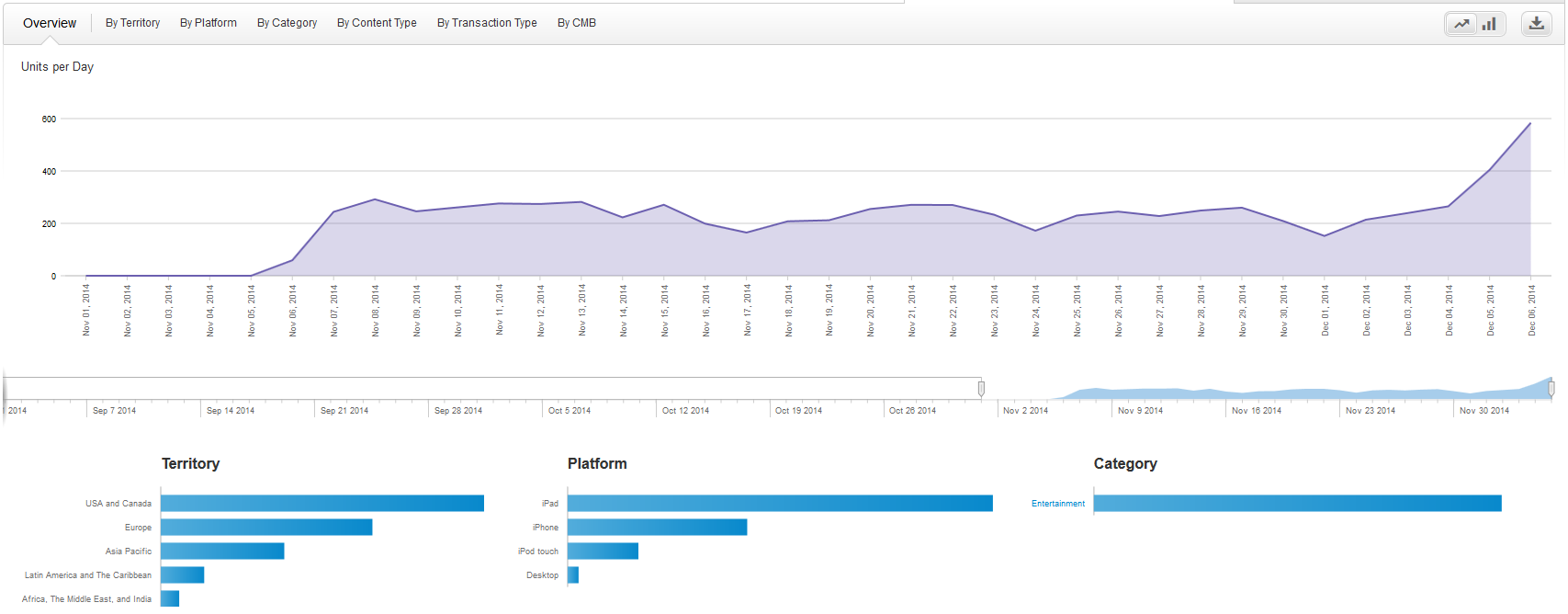
The graph above should tell you everything you need to know. Notice the big spike this weekend. I couldn’t tell you the reason for it, but I’m not going to complain. Whether or not those kind of downloads persist is yet to be seen, but again – no complaints.
So that’s the quick rundown for how the App Store has been treating me. The great thing is that from all of the revenue from the iOS version alone, I’ve almost broken even in terms of the money I spent for a developer license and a used Mac Mini – in only one month. Definitely didn’t expect that, but it’s great news.
I’ll do a more in-depth summary of both the Android and iOS versions once some more time has passed.
So after a good amount of time, effort, and money, I’m proud to announce that Stick Nodes has finally made its way to iOS devices!


You can keep up to date with updates and changes through the official website, Facebook page, or Google+ page.
And for those of you interested, here are some updated stats!
Google Play
12,600+ installs (+10,100 in 6 weeks)
380+ ratings at a 3.8 average (+280 in 6 weeks)
61 Pro purchases (+34 in 6 weeks)
Other markets (combined)
1,800+ installs (+940 in 6 weeks)
29 Pro purchases (+19 in 6 weeks)
I’m very happy with the overall growth of the app. It currently sits at over 300 installs per day and peaks at nearly 500 on weekends (weekends seem to be the most popular day for new app installs).
Overall, not many people are going for the Pro version. As it stands, roughly 0.6% of users actually upgrade to the Pro version. The ads from the free version also contribute a decent amount of pocket change, so the combined income isn’t too bad. I have to admit I wasn’t looking to “make it big” with Stick Nodes, though, so any income is more than I expected.
The next post will contain updated data as well as data from Apple’s App Store. Curious to see if it truly is “better” than Google Play in terms of app downloads.
Well, one month and three days but close enough.
So I just wanted to give a quick update on what’s going on with Stick Nodes. The app has been out for a month on Google Play (as well as other smaller Android markets) and here’s where it stands.
Google Play
- 2,500+ installs
- 100+ ratings at a 4.2 average
- 27 Pro purchases
Other markets (combined)
- 860 installs
- 10 Pro purchases
Stats
- Total of 15,000+ total sessions
- New users every day are averaging around 180, with 236 this past Saturday
- Most popular countries (in order): USA, Brazil, Russia, UK
- Most popular devices (in order): Kindle Fire HD, Kindle Fire HD 7, Kindle Fire HD 7 (3rd Generation)
- 30,000+ stickfigures have been imported
(Google Analytics provides incredibly useful and interesting data from your app, definitely recommend implementing it into your projects.)
Anyway, I’m extremely happy with how Stick Nodes is doing so far. The best part is that the daily stats are getting better – meaning that things are only looking up from here.
iOS Development
I had planned to begin porting Stick Nodes to iOS this past weekend. I ordered a used Macbook Pro from eBay and boy, did it take its sweet time shipping – but nearly two weeks later it arrived. The second time I turned it on I was greeted with a black screen and no sound.
I now have a used Mac Mini on the way, hopefully it’ll be here by the weekend so I can finally get on with this iOS nonsense.
So guess what? Well, the title is a pretty dead giveaway, but yeah, Stick Nodes is finally released on Google Play (other Android stores coming very soon, and then maybe even iOS – we’ll see).
There are two versions, a free one and a pro one. They both contain the same features – the only difference being the free version contains a quick ad on startup and applies a small watermark on export .gifs. The pro version contains no ads and no watermark.
Keep up to date
I won’t be doing too much talking about Stick Nodes here, well, at least not as much as I will on the official website, official Facebook page, and official Google+ page – so check those out for the most up-to-date info (mainly future updates and stuff).
So there you go, 4.5 months of work finally coming to fruition – give it a download and a rating (preferably a good one but you know, whatever).
The app comes with a credits.txt file in the main directory (created on the external SD card), but I’ll also post the contents here:
Stick Nodes by Ralph Damiano
Website: sticknodes.com
Developer: fortheloss.org
Copyright 2014. All rights reserved.
Stickfigure credits
Tuna: Bench, Bird, Sword, Classic Stickfigure
Mat: Pistol, Uzi, Sniper
Sean Byrnes: Block Head, Cha Fighter, Shirt Guy
Ralph Damiano: Little Dude, Ninja, Stickfigure, Swish, Bendy Spine, Floor
Special thanks
Peter Bone for allowing compatibility with Pivot .stk files.
Sean Byrnes for being an awesome beta tester and stick-creator.
Brandon Ridener for being humorous.

So guess what?
The Stick Nodes BETA is live. If you have an Android device, you can try it out right now. Here’s how:
- Become a member of the Stick Nodes BETA Testers Google+ community.
- Follow this opt-in link (while logged in to the same Google account used to join the Google+ community above) to be directed to the Google Play store listing.
That’s all. Please give it a try and let me know of any bugs, suggestions, or anything else!
How to follow Stick Nodes updates
Want to keep updated on the latest Stick Nodes news and updates? Here are your options:
- The official website
- The Facebook page
- The Google+ page
Alright, gotta go fix some stuff. Expect the official release very, very soon!